How to Use Video in Your International Student Marketing Plan

When you scroll through your social media feed, are you more likely to read a post from a brand or watch a video? If you answered 鈥渨atch a video,鈥� you are a part of the majority of consumers in today鈥檚 market. According to HubSpot, 鈥�54% of consumers want to see more video content from a brand or business they support.鈥� Our personal experience on social media supports this as we tend to see prospective students interact more with video content than any of our other social media content. With the demand for video content as high as it is, it鈥檚 important to create fresh and entertaining content that grabs the attention of your target audience and gets them to your institution鈥檚 website. In this article, we鈥檙e going to show you just how to do that.
Types of Video Content
We鈥檙e going to dive into how to use video in your marketing through discussing three types of video content that are prevalent in today鈥檚 social media market. The three main types of video content we鈥檒l be discussing are:
- Long-Form Video: Typically the video lasts longer than 10 minutes.
- Short-Form Video: Typically the video lasts less than 10 minutes.
- Live Video: Video that is not pre-recorded and is streamed live to an audience.
Each of these types of video have unique uses. Now, let鈥檚 go through how to use them.
Long-Form Video
Long-form video is the type of content that is best suited for YouTube. According to Wired.com, 鈥淭hese days smartphone users spend a whopping 54 percent of their video-viewing time on videos over 20 minutes long鈥攖hat鈥檚 up from just 29 percent in the beginning of 2016.鈥� This research shows that, in general, longer videos are likely to perform better than shorter videos as people tend to use smartphones to watch YouTube videos more often. Some examples of long-form video are:
- Behind-The-Scenes Videos
- Documentaries
- Presentations
- Short Films
- Vlogs
Take a look at this example, a documentary entitled , from the Massachusetts Institute of Technology (MIT).
This documentary serves a dual purpose for MIT. Not only does it increase the reach of the institution, it also speaks to MIT鈥檚 credibility. We understand that not every institution will have access to the resources necessary to create such a video; but taking advantage of the resources you do have is essential in creating video content that will help gain interest in your institution. We strongly recommend that you utilize your current students in your content as prospective students can likely relate to them better than a school administrator.
Another great idea for when you post a video to your YouTube channel, is to link back to your institution鈥檚 website in the description. We recommend that you make this link relevant to the topic of the video. YouTube also allows you to add links that will pop up while a user is watching your video. These links are called cards. When you publish a video on YouTube, you will be given the option to add a card. Here are the steps to adding your own card:
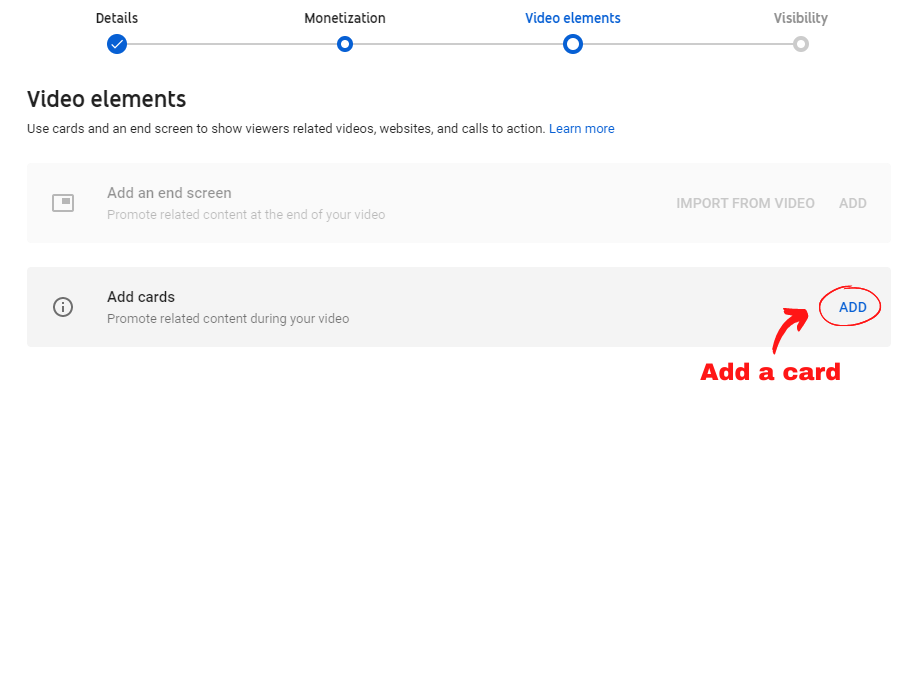
Click on the 鈥淎dd鈥� button next to 鈥淎dd cards鈥�.
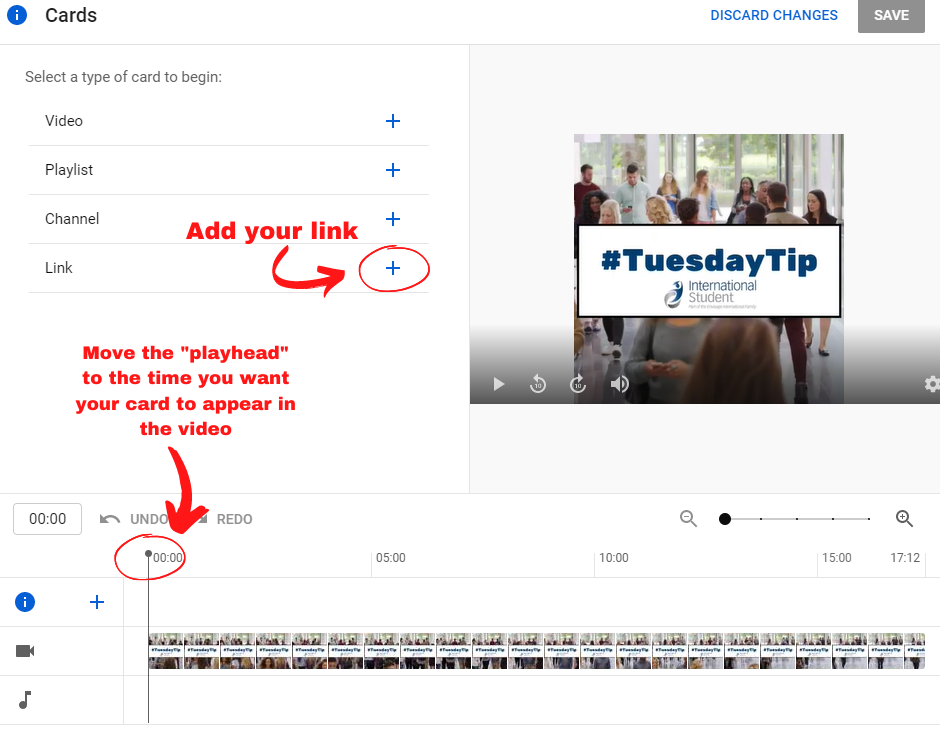
Then, click on 鈥淟ink鈥� to add a link to your institution鈥檚 website to the card. You will need to add a call to action message to present on the card such as 鈥淰isit our website.鈥� Next, select a time for the card to pop up during your video.
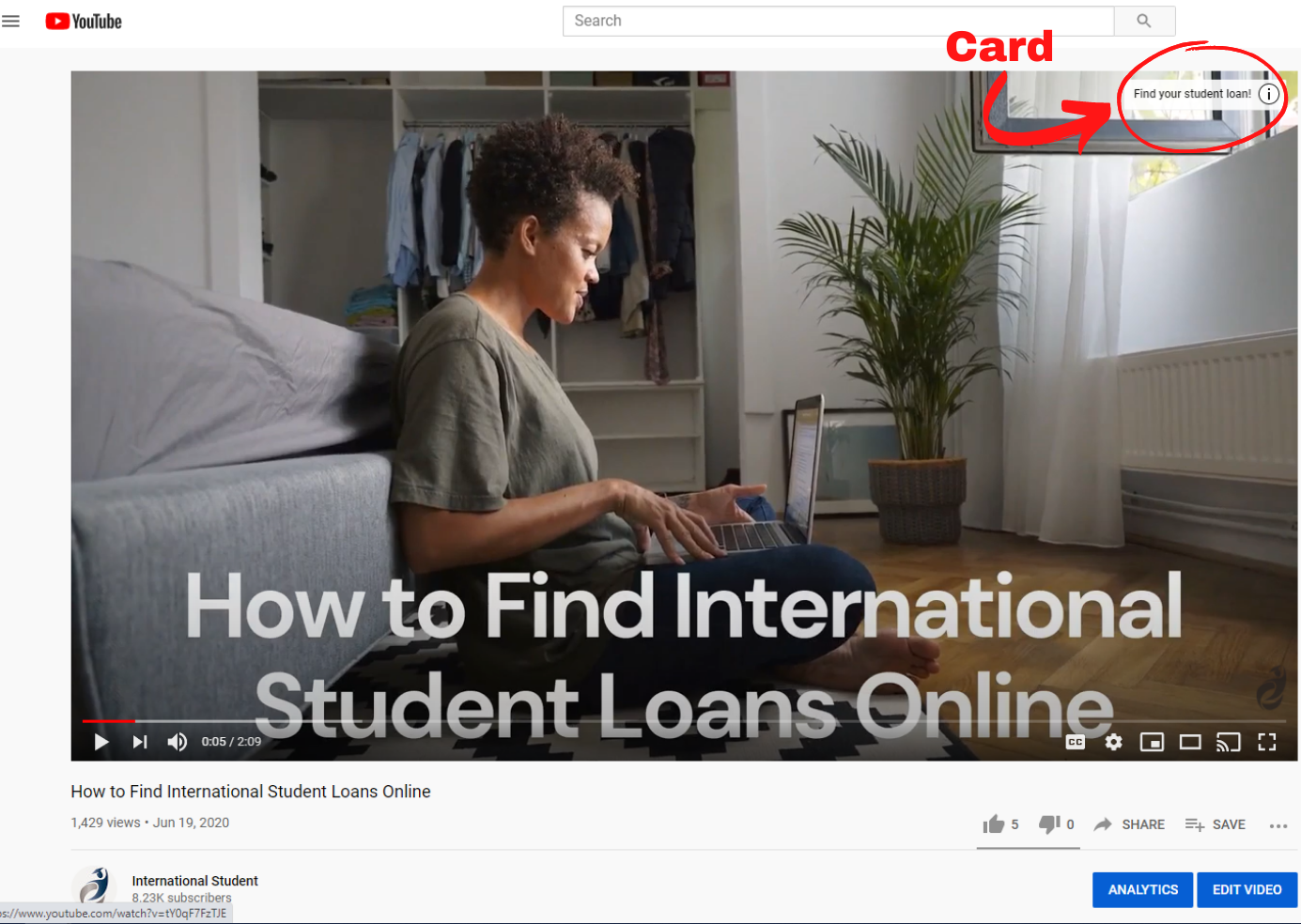
Once you have added a card, it will show at the time of the video that you have selected it to show. For example, in our 鈥淗ow to Find International Student Loans Online鈥� video, the card pops up at 0:05. The user can click on this card and see the link to your website.
Short-Form Video
While long-form videos are on the rise, short-form video content is of equal importance to master as some social media platforms prefer this type of content to long-form content. Examples of short-form video are:
- Instagram Videos
- Ads
- Interviews
- Testimonials
- Event Coverage
- Tutorials
The biggest social media platform for short-form videos in today鈥檚 market is Instagram. Within the last few years, Instagram has moved more towards video content, adding numerous features with video capabilities. On Instagram, there are four different post formats for videos: posts, Stories, IGTV and the latest installment, Reels. IGTV videos are typically long-form, so we鈥檒l just be discussing video posts, Stories and Reels in this section of the article. First and foremost, let鈥檚 discuss video posts.
Video Posts
For your institution, it鈥檚 a good idea to highlight your students in your posts. For example, you can post interviews, events or testimonials. We find that prospective students interact more with posts that have students in them. Take a look at our .
Now, think of something that could be made into a series like this for your institution. Possibly an interview series or a testimonial series? Curating a series gives your audience something to look forward to. You can opt to have a weekly series or a monthly series. Either way, video series are an excellent way to keep your audience engaged.
Instagram Stories
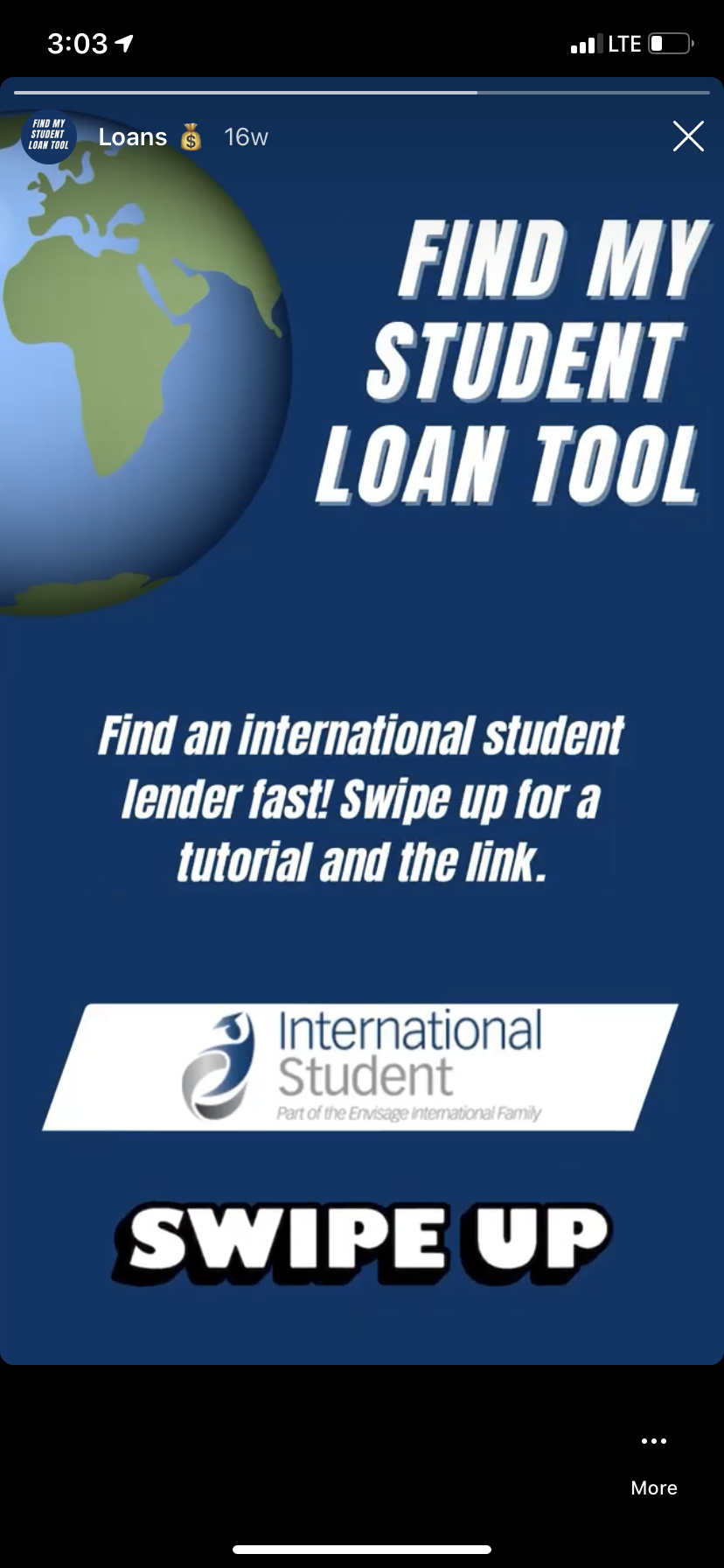
Next, let鈥檚 look into using video for Instagram Stories. Hootsuite says, 鈥淥n average, brands post 2.5 Instagram Stories each week. More than 30% of Instagram鈥檚 most-viewed Stories are from businesses. Plus, brands鈥� Stories have an 85% completion rate.鈥� We recommend posting more than just 2.5 times a week as we typically aim to post on our story 5 days a week. Your video stories can be a quick update from a person in your office about what鈥檚 going on at your institution, or promotional videos. It鈥檚 important to remember that Instagram isn鈥檛 really a link-friendly platform. There are only two ways to direct users to your website:
- Put a link or in your bio.
- Attach a link to a Story and prompt the user to 鈥淪wipe up鈥� (only for accounts with 10,000 followers or more).
If your institution鈥檚 account has surpassed the 10,000 follower threshold, then we strongly suggest linking to your website through Instagram Stories. Consider posting a short video clip on your Story then prompting the user to watch the rest of the video by swiping up to your website.
Reel Feature
Finally, the latest addition to Instagram is the Reel feature. Reels are essentially Instagram鈥檚 version of TikToks. It is still a very new feature and the exploration of balancing the benefit is still in progress with us. But with it being a new feature, it may be a good idea to be one of the first to hop on the trend.
Live Video
As we鈥檝e had to remain at a distance from each other for the majority of this year, live video has become an integral part of the social media experience. Live video is often called livestreaming, and is when a person or a group of people broadcast on the web completely live and unedited. Examples of types of livestreams that your institution can try include:
Your institution will likely use one or more of the following three social media platforms to livestream: Instagram, Facebook and YouTube.
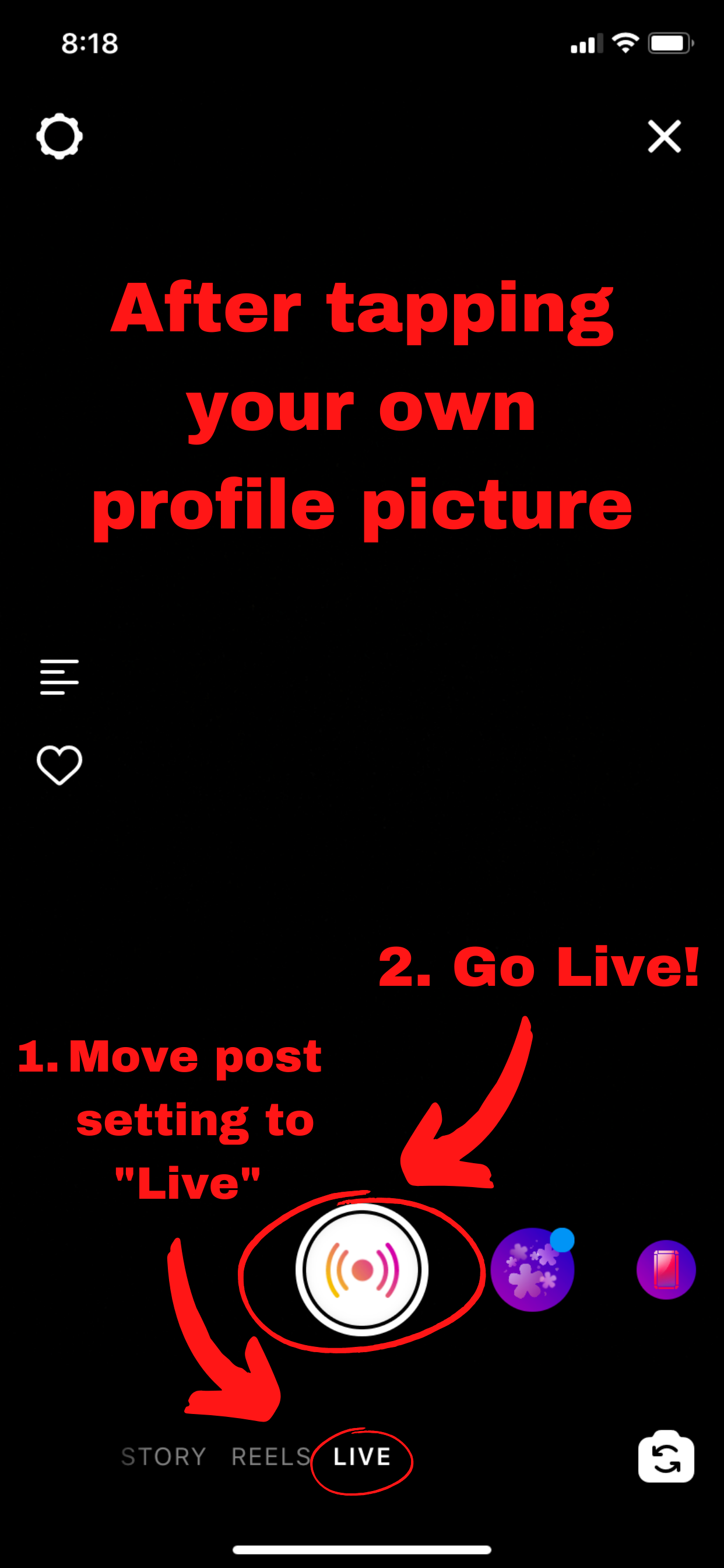
First, let鈥檚 chat about 鈥淕oing Live鈥� on Instagram. Instagram is arguably the easiest platform to livestream on. It鈥檚 as easy as tapping your profile picture as if you were adding to your Story, then pressing the button to go live as shown in the screenshot on the right.
After you鈥檝e begun livestreaming, the users who have joined the stream will appear in real-time at the bottom of the screen. These users will be allowed to leave comments which makes it easy for a casual discussion-based stream. Instagram Live allows for the owner of the livestream to add one more user to their stream, making it a two-person, split-screen stream. The user wishing to join the stream must send a request to the owner to be added in order for the owner to have the ability to bring them into the stream. These capabilities are why some institutions like to have information/Q&A sessions and interviews on Instagram Live. After you鈥檙e done with the livestream, we recommend uploading the video to IGTV so that those who missed it can watch it at any time.
Facebook and YouTube
Next, let鈥檚 discuss livestreaming on Facebook and YouTube. While both of these platforms allow for you to stream directly from them, there are limitations that come with the built-in services such as the amount of people allowed in a stream. We recommend streaming from a third-party app to increase the capacity of your livestream and for other added capabilities. For suggestions on third-party apps for live streaming you can contact us for more information. No matter where or how you choose to stream, it is important to remember to promote your event and lead prospective students back to your website. Here鈥檚 our step-by-step guide on how to market your live event:
Step 1: Choose a catchy and searchable title that relates to your livestream鈥檚 topic.
Step 2: Create a graphic to market the event that includes details such as the time and place of the stream.
Step 3: Create a Facebook Event page or a sign-up sheet so that students can let you know that they are interested in or will be attending the stream.
Step 4: Write a script to go by and practice what you will be discussing during the event.
Step 5: Schedule your event to let your audience know that you plan to go live.
Step 6: Go Live.
Step 7: During and after the stream, be sure to have someone moderate the comments that are coming in.
Step 8: Have a call to action. Provide links to the relevant page(s) on your website in the comments to ensure that the viewers visit and perform your call to action.
Now that you have a better understanding of the types of video content that are prevalent on social media in today鈥檚 market, try and apply what you know to your international student marketing plan. Remember, that if you require assistance with adding more video content to your marketing plan, we are happy to be of help. Send us an email at info@internationalstudent.com to ask us any questions, or to learn more about how our live event advertising add-ons can help!